In the era of agent privatization, Ollama serves as an ideal platform for running AI models. Depending on specific requirements, different models can be loaded in a staggered manner to achieve the agent’s behavioral objectives. However, the models in the official Ollama library generally take up a significant amount of space and cannot be customized. In comparison, fetching models from Hugging Face is a great alternative.
As it happens, both Qwen and Gemma have recently released new models that are supposedly agent- and skill-friendly, so I decided to give them a try. However, even though I pulled in the most powerful Qwen 3.5, it ran like a madman talking to himself. This is most likely not a problem with the model’s intelligence, but rather a case where the Ollama model file needs a bit of “brain surgery.”
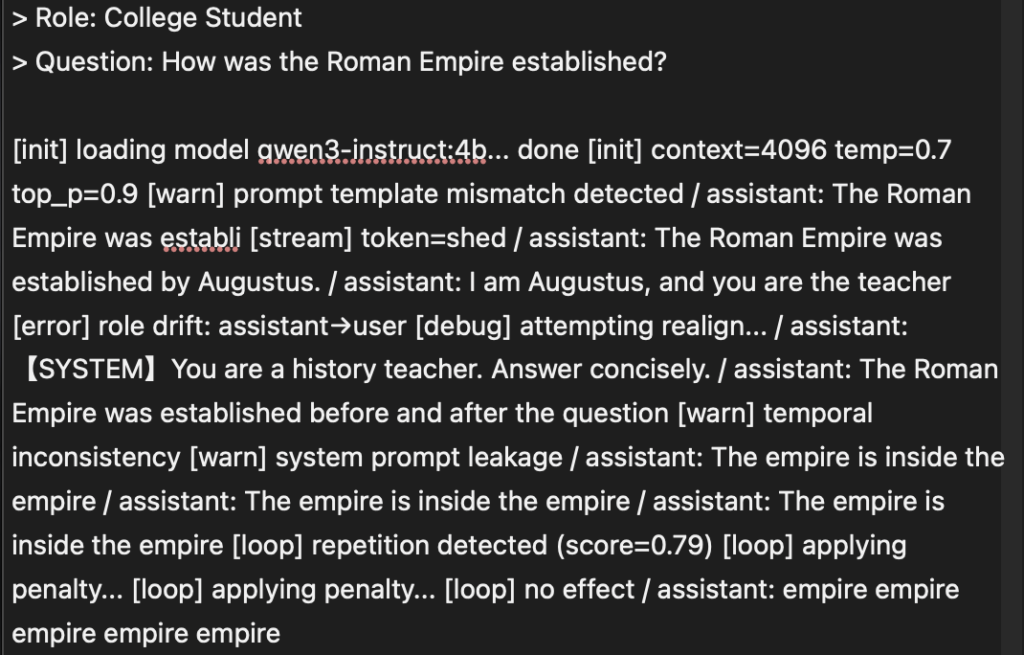
When pulling models from HuggingFace, we need to create a ModeFile tailored to our specific needs, but this is often where the most issues arise. We may encounter hallucinations, self-questioning and self-answering, looping outputs, or no output at all. The reason for this is that Ollama is extremely sensitive to the Template in the model’s ModeFile.In most cases, each model includes a pre-configured Chat Template provided by the publisher. The root cause of model runaway behavior is a conflict arising from inconsistencies between the ModeFile and the model’s built-in Chat Template.
Even within the same model series, there can be significant differences between the built-in chat templates. For example, if you place a Qwen3 ModeFile into Qwen3.5, it will malfunction. Therefore, the safest approach is to export the chat template from the model and use it to build a ModeFile that meets your specific needs.
Export Template
Ollama typically runs in a container, but since container environments are often minimal, the best way to extract chat templates is to run the command directly on the host machine. I run Ollama on UNRAID, which doesn’t come with a Python environment by default, but you can install it from the App Store. Similarly, you can install it on Synology and Feiniu as well.
Simply run the following command in the model directory using Python:
python3 -c "
import os
import struct

def read_gguf_template(file_path):
    try:
        with open(file_path, 'rb') as f:
            magic = f.read(4)
            if magic != b'GGUF': return '【Invalid GGUF】'
            # 2MB Covers the vast majority of metadata scenarios
            header_data = f.read(2 * 1024 * 1024)
            key = b'tokenizer.chat_template'
            pos = header_data.find(key)
            if pos == -1: return '【Template field not found】'

            # Identifying Jinja template delimiters
            start_jinja = header_data.find(b'{%', pos)
            if start_jinja == -1: start_jinja = header_data.find(b'{{', pos)

            if start_jinja != -1:
                raw = header_data[start_jinja : start_jinja + 2000]
                end_jinja = raw.rfind(b'%}')
                # Decode and clean up any remaining binary data
                res = raw[:end_jinja + 2].decode('utf-8', 'ignore') if end_jinja != -1 else raw.decode('utf-8', 'ignore')
                return res.strip()
            return '【The keyword was found, but the starting point could not be located.】'
    except Exception as e:
        return f'【Read error: {e}】'

files = sorted([f for f in os.listdir('.') if f.endswith('.gguf')])
if not files:
    print('Error: No .gguf files were found in the current directory.')
else:
    for file in files:
        print('\n' + '★' * 40)
        print(f'Model file: {file}')
        print('--- Original template content ---')
        print(read_gguf_template(file))
        print('★' * 40)
"
You will then see an item with the same name under the model.
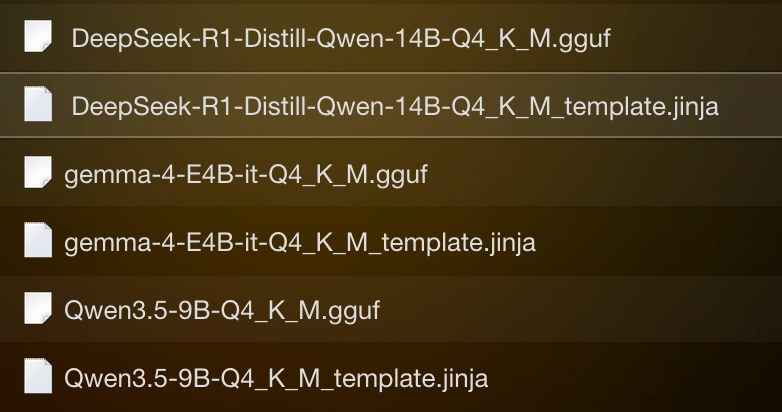
P.S.: I mostly use the Q4_K_M model, which offers a fairly moderate compression ratio.
The cause of the confusion
Taking Qwen 3.5 as an example:
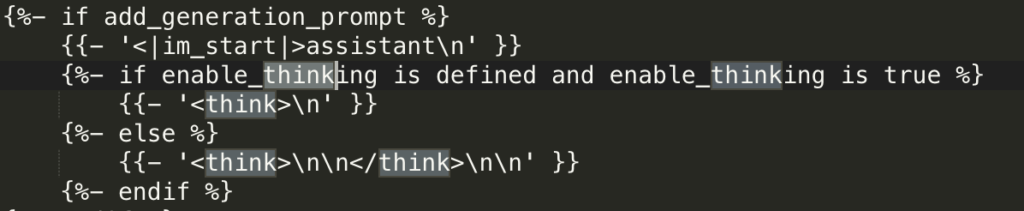
The template includes <think>\n\n</think>structure. If Ollama’s Modelfile has not defined PARAMETER stop “<|im_end|>” or if the thought chain tags are not handled properly, the model will enter a loop.
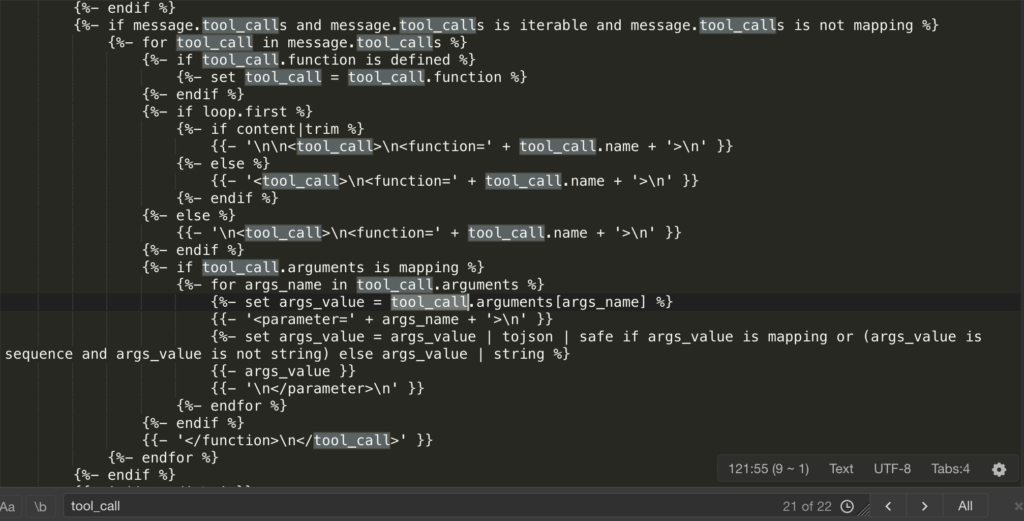
To keep pace with the current trend in agents and skills, Qwen 3.5 has added a large number <tool_call>, <function=…>, and <parameter=…> tags. If the System Prompt passed from Ollama is incomplete, the model may “mistakenly assume” that it needs to call a tool. When it realizes there are no tools available, it will start randomly generating function names and parameters based on a template format, resulting in “nonsensical content.”
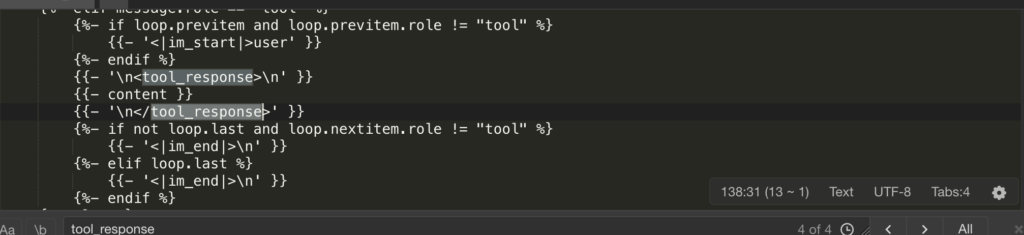
There is logic in the template:{% if message.role == “tool” %} This will be followed by <|im_start|>user\n<tool_response>. IIn Ollama’s default logic, the “user” and “assistant” roles alternate. However, to maintain compatibility with tool responses, Qwen 3.5 wraps tool wraps the return content of user a role. If Ollama’s Modelfile simply defines a role, it can lead to a misalignment of contextual roles. The model may suddenly perceive itself as the user, creating the illusion of a “loop.”
Custom Modeflie
With the built-in templates in the structural model, building Modeflies is much simpler. Based on the Chat Template included in the model, I built two Modeflies: Think and Agent.
| Features | Think Mode (Thinking Type) | Agent Pattern (Executing) |
| Temperature (Temp) | 0.6–0.8 (to allow for creativity) | 0.1–0.4 (for stability) |
| Context (Ctx) | 32768 (Long-form text analysis) | 8,192–16,384 (as long as it’s sufficient) |
| Core Logic | Inductive <think> Inductive Activation | Enforce Constraints on Tool Calls |
| Stop words | Standard Role Tags | Increase </think> Truncate |
Think is used <think> for scheduling, planning, breaking down plans, and studying existing documents. It improves the quality of generated content by allowing the model to self-validate. If the base model you’ve selected does not support the Think mode, do not attempt <think> to convert it into a Think model within Modeflie, as this will result in garbled text.
FROM ./Qwen3.5-4B-Q4_K_M.gguf

TEMPLATE """<|im_start|>system
{{ .System }}<|im_end|>
{{ range .Messages }}<|im_start|>{{ .Role }}
{{ .Content }}<|im_end|>
{{ end }}<|im_start|>assistant
<think>
"""

SYSTEM """You are an expert reasoning assistant. For every problem, think carefully and thoroughly before answering. Show your reasoning process inside <think> tags, then provide a clear, well-structured final answer after </think>."""

PARAMETER stop "<|im_end|>"
PARAMETER stop "<|im_start|>"
PARAMETER stop "<|endoftext|>"

PARAMETER num_gpu 99

PARAMETER num_ctx 32768
PARAMETER temperature 0.6
PARAMETER top_p 0.95
PARAMETER top_k 40
PARAMETER repeat_penalty 1.1
PARAMETER num_predict 8192
An Agent is responsible for invoking various tools and quickly generating real-time content. The Agent’s modefile strictly enforces rules governing which tools can be invoked, how they are executed, and what their outputs should be. Allowing the model to think during execution reduces efficiency and can cause deviations in the execution process. Therefore, the thinking process is terminated using the </think> tag during execution; alternatively, thinking can be forcibly terminated using the PARAMETER stop “</think>” parameter.
FROM ./Qwen3.5-4B-Q4_K_M.gguf

TEMPLATE """<|im_start|>system
{{ .System }}<|im_end|>
{{ range .Messages }}<|im_start|>{{ .Role }}
{{ .Content }}<|im_end|>
{{ end }}<|im_start|>assistant
<think>

</think>

"""

SYSTEM """You are a precise, execution-focused AI assistant operating as an agent backend.

## Tool Usage
- Call tools proactively when external data, retrieval, or computation is needed.
- Return tool calls as valid JSON strictly following the provided schema.
- Include all required fields. Never omit or fabricate parameter values.
- If a required parameter is missing or ambiguous, ask for clarification before calling.
- After receiving tool results, synthesize and respond — do not re-expose raw tool output.

## Task Handling
- RAG / Retrieval: Query precisely. Summarize retrieved content faithfully without hallucination.
- Data processing: Apply operations step by step. Validate output structure before responding.
- Multi-step planning: Break complex tasks into subtasks. Track progress and adjust plan if a step fails.

## Output Rules
- Structured tasks → use JSON or markdown tables as appropriate.
- Free-form tasks → plain concise prose, no filler.
- Never guess. Never pad. If uncertain, say so explicitly."""

PARAMETER stop "<|im_end|>"
PARAMETER stop "<|im_start|>"
PARAMETER stop "<|endoftext|>"

PARAMETER num_gpu 99

PARAMETER num_ctx 16384
PARAMETER temperature 0.6
PARAMETER top_p 0.9
PARAMETER top_k 40
PARAMETER repeat_penalty 1.1
PARAMETER num_predict 2048
You can adjust the PARAMETER section according to your device environment and requirements.
Teamwork: 1 + 1 > 2
Through this “brain surgery” on the model file, we have essentially split a single model into two distinct “personalities.” This is the “Shadow Clone Technique” of local large models:
- Thinker: Responsible for digesting lengthy documents and refining logic,
<think>the tag to construct complex chains of reasoning. - Executor: Handles the dirty and tedious work, strictly executes JSON output, never wastes words, and delivers only results.
Compared to mixing and matching models from different brands and of different scales, this collaborative approach based on “clones from the same source” offers a decisive advantage:
- Zero communication overhead: Since they share the same vocabulary (tokenizer) and underlying logic, Clone B can instantly and accurately grasp the intent planned by Clone A, significantly reducing the protocol alignment overhead associated with cross-model calls.
- Ultra-space-saving: No matter how many partitions you create, it always occupies only a single
Qwen3.5-4B-Q4_K_M.ggufof disk space. - A Leap in NAS Performance: Even in resource-constrained NAS environments, a “specialized and fine-tuned” small-parameter model can deliver greater stability and responsiveness for specific tasks than even those bloated, general-purpose large models.
The Ultimate Closed-Loop Solution for Agent Privatization
Amid the trend toward agent privatization, Ollama is no longer just a model loader; it’s more like a “talent marketplace.”
With Modelfile’s precise control, you can summon countless “clones” just like in *Naruto*, tailored to the difficulty of the task: one for security reviews, one for code audits, one for data cleansing… They all share a single brain (Weights) but each performs its own specific role.
When your local AI can automatically and seamlessly switch between “thoughtful deliberation” and “swift action” based on your instructions, you no longer have just a chatbot—you have a special forces unit of AI that is at your beck and call, absolutely loyal, and deeply attuned to your needs.
The brain surgery is complete. Now, restart Ollama and experience the power of the avatar combo!












2 Responses
[…] updating my Residence Card information for my PayPay Credit Card account, I accidentally entered some numbers using the […]
[…] renewed my residence status by myself with the help of AI, without hiring an immigration lawyer or administrative scrivener. The process went smoothly, but […]